Rent invoices and payments
Rent invoices and payments, without the register
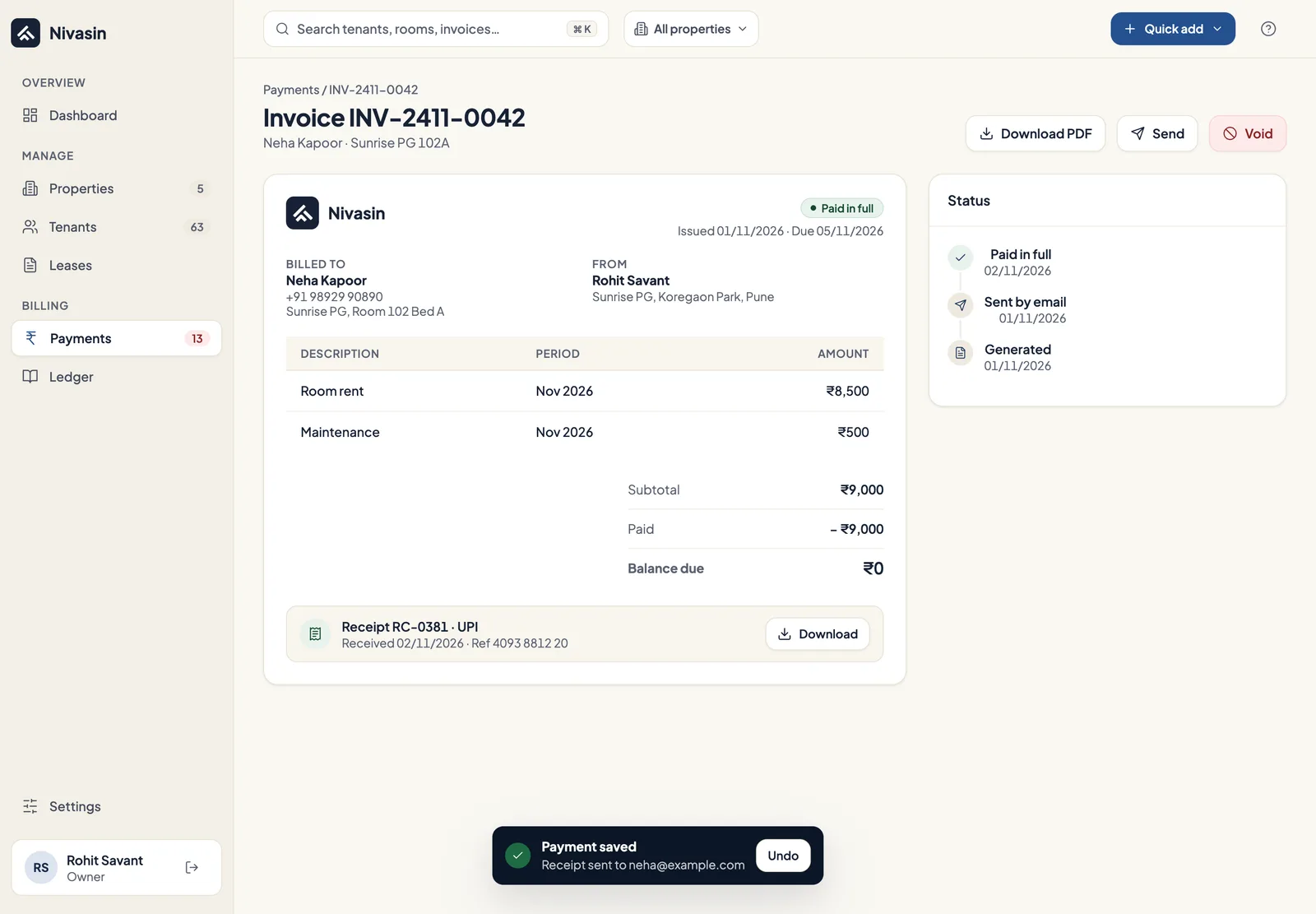
Nivasin generates each lease's invoice every month, with rent and other charges itemised. When a tenant pays, you record it against the invoice, the receipt is ready, and the balance updates everywhere.
The problem it solves
Most PG owners rebuild the same bills every month from a register and a calculator, then chase each tenant on WhatsApp. A payment written on paper and entered later, or never, is how the books drift from the bank account.
How it works in Nivasin
-
Charges come from the lease
Rent, maintenance and any other monthly charge are set on the lease, so every invoice starts out correct.
-
Invoices are generated monthly
Invoices are created automatically each month. You can also generate one yourself and add a custom line, like a water bill or a parking fee.
-
Record the payment
Log cash, UPI, bank transfer, cheque or card against the invoice, in full or in part, with its reference number.
-
Receipts and status
Every payment has a receipt, and each invoice shows as paid, partly paid, pending or overdue.
What's included
- Itemised monthly invoices
- Custom charges like water or parking
- Full and partial payments
- Extra payments kept as a credit balance
- A receipt for every payment
- Collection and on-time rates, with CSV export
Common questions
Does Nivasin collect rent online?
No. Tenants pay you directly by UPI, cash, bank transfer, cheque or card, and you record the payment in Nivasin. The money never passes through Nivasin.
What happens when a tenant pays only part of the rent?
Record the amount they paid. The invoice is marked as partly paid and the balance due stays on it until the rest comes in.
What if a tenant pays more than they owe?
The extra is kept as a credit balance on the tenant's account, so nothing is lost or written off by hand.
Works together with
Owner dashboard
Rent collected against expected, upcoming dues and overdue payments across every property, the moment you sign in.
Leases and agreements
Rent, security deposit, monthly charges, lock-in and notice periods recorded on every lease.
Ledger and expenses
Every rupee in and out per property, with categories, attached bills and reversals instead of edits.
See your own building in Nivasin
Tell us how many properties and beds you run, and we'll walk you through Nivasin using a setup that looks like yours, so you can judge it on your own numbers.